View tree
A view is a tree of TUI.Node values, which TUI.run draws (Elm loop). By hand, TUI.Raw.render(screen, node, last) draws the tree over the whole screen and presents it, and gives the TUI.Raw.Grid the screen now shows. With that grid as last, the next render writes only the cells that changed; with no last, it clears the screen first. Pass a last only when the render that gave it succeeded and nothing was drawn since.
import TUI from "pkg/tui/tui"

def view(count: Int) -> TUI.Node
  title = TUI.text("Counter", style: TUI.Style(bold: true))
  value = TUI.text("count: #{count}", style: TUI.Style(fg: TUI.Color.Green))
  box = TUI.box(TUI.col([title, value]), padding: 1, border: TUI.Border.Line, style: TUI.Style(fg: TUI.Color.Cyan))
  TUI.col([box, TUI.spacer(), TUI.row([TUI.spacer(), TUI.text("q quits")])])
end
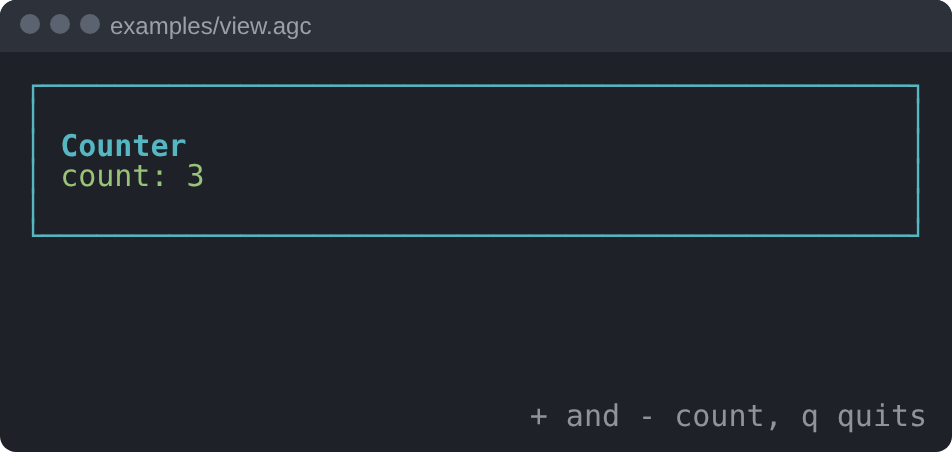
examples/view.agc draws this tree, with a longer help line, in a terminal of 50 by 12 cells:
Nodes #
text(text, style): the lines oftext(split at\n), wrapped at spaces to the width it gets; a word longer than the line is cut.stylemay be left out.row(children): side by side. Each child, in order, takes the width it needs of what is left, and the height of the row; spacers and children with a list share the width the others leave.col(children): one under another. Each child takes the whole width and the height it needs. The lists share the lines the others leave, each up to one line per item, and the spacers share what the lists leave.box(child, padding:, border:, style:):paddingcells around the child (a negative padding is 0), a border (Border.None, the default, orBorder.Line), and the box filled withstyle. The styles inside are drawn onstyle(merge). Every option may be left out.spacer(): an equal share of the room that the other children of a row or a column leave.line(spans): one line that never wraps, made ofspan(text, style)parts, each in its own style. It is cut at the width (before a wide character that does not fit), keeps its spaces, and draws a newline as a space.list(items, selected, focus): below.
These build the variants of Node: Text(text, style), Row(children), Col(children), Box(child, frame) with Frame(padding:, border:, style:), Spacer, Line(spans) and List(items, selected, focus).
Lists and tables #
list(items, selected, focus): the items, one line each (a taller item shows its first line), with the item atselectedinfocus(reverse when left out). When they do not fit in the room the list gets, it scrolls to keep the selected item in the middle, or as near as the ends allow. Aselectedoutside the items marks none. It never reads the items it does not show, so a long list costs what its visible lines cost.list_first(count, selected, rows): the index of the first item a list ofcountitems shows inrowslines, so that a click on rowrof the list is itemlist_first(count, selected, rows) + r.table(cells, widths): the lines of a table, onelinefor each row ofcells. Each column is as wide as its widest cell, orwidths[i], with one space before the next. Longer text is cut, a newline is a space, a column of width 0 or less is left out, and the cells past the last width are dropped.
The lines of a table go into col for a plain table, or into list to select a row:
import TUI from "pkg/tui/tui"

struct Entry
  name: String
  size: Int
end

struct Files
  entries: List[Entry]
  selected: Int = 0
end

def view(files: Files) -> TUI.Node
  rows = files.entries.map { |entry| [entry.name, "#{entry.size}"] }
  lines = TUI.table([["name", "size"]] + rows)
  TUI.col([lines[0], TUI.list(lines.drop(1), files.selected)])
end
update moves selected with the arrow keys.
Layout #
TUI.layout(node, width, height) gives the cells of a tree on a screen of that size, with no terminal: a list of Cell(x:, y:, char:, style:). render draws those cells. Nothing is drawn outside the screen. Each node is measured once per level of the tree, so the time grows with the size of the tree times its depth.
TUI.Raw.diff(old, new) gives the cells to write to turn one Grid into another: those that differ, or all of new when the size differs.
TUI.wrap(text, width) gives the lines that text wraps to.
Widths #
Widths are terminal columns, from the wcwidth table of glibc 2.41 (src/width_table.agc, made by scripts/width_table.py): a wide character takes two columns, a combining mark none. A combining mark or a zero-width joiner is drawn on the cell before it, with that character (e and U+0301 show as one é). A variation selector (U+FE00 to U+FE0F) is left out: many terminals draw ⚠ with U+FE0F two columns wide, which would shift the rest of the line. termbox2 draws with the wcwidth of the glibc it runs on, so on another glibc a character may take another width on screen than in the layout.